
Technical SEO audit checklist
A technical SEO audit checklist is a structured list of technical fixes that determine whether search engines can find, crawl, render, and index your site correctly. It covers crawlability, indexability, site speed, mobile-friendliness, HTTPS, structured data, and the on-site architecture Google uses to decide rankings. Use the technical SEO audit checklist below to run a complete audit in execution order, from robots.txt through Core Web Vitals, so nothing slips between sections.
Most teams treat a technical audit like a checklist to glance at, then forget. That's how orphan pages, redirect chains, and broken canonical tags quietly compound for months until a core update exposes them. We treat audits the way Google treats them: as a system of dependencies. Fix crawl first, then index, then everything else, because each layer breaks if the layer below it isn't clean.
If you need the conceptual foundation (what technical SEO actually is and why Google weighs it the way it does), read our primer on technical SEO signals in the March 2026 Core Update. This post skips that and goes straight to the work.
These are just a few components of technical SEO. If you wanna read more about it, read more about it in this blog.
SEO Audit Steps: The Order That Matters
Most teams run seo audit steps in whatever order feels natural. That is how subtle issues get missed. Audit order is not a stylistic choice. It is mechanical. Crawlability issues block every downstream signal. Indexation issues invalidate any speed or schema work because Google never reaches those pages. Core Web Vitals matter only if the page can be indexed in the first place.
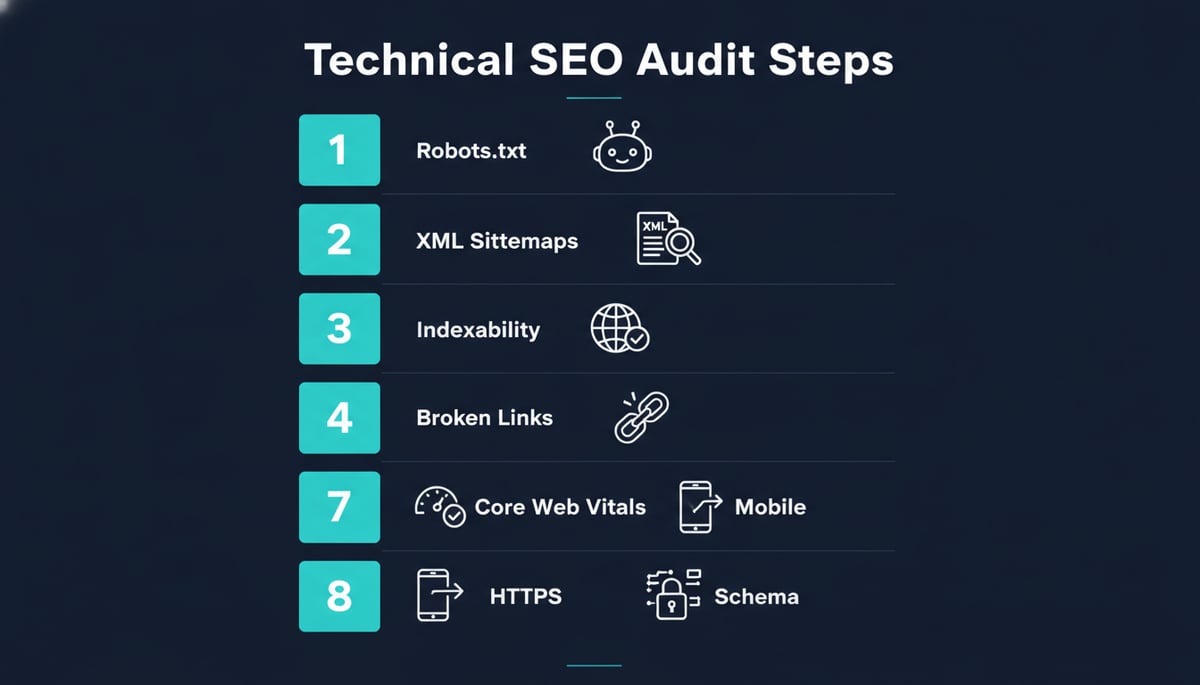
The audit sequence below is the same one we use internally when auditing our own blog and any client property we touch:
- Robots.txt and crawl access
- XML sitemaps
- Indexability (canonical tags, noindex, index coverage)
- Broken links and redirect chains
- Site speed and Core Web Vitals
- Mobile-friendliness
- HTTPS and security headers
- Structured data and schema
Run them in this order. Document every finding in a single issue log, prioritized by impact, not by how easy the fix looks.
If you are looking to hire an SEO audit agency, read how you can choose the correct one for your business with our guide.
How to Do a Technical SEO Audit: Setup Before You Crawl
Knowing how to do a technical seo audit well is mostly about what you do before you touch a crawler. Before you open Screaming Frog or Sitebulb, set up four things. Skip this and you'll spend hours re-crawling.
- Pull baseline Search Console data. Export the last 90 days of Pages, Performance, and Core Web Vitals reports. You need a "before" snapshot.
- Connect your sitemap URL. Confirm
https://yourdomain.com/sitemap.xmlresolves and validates. - Decide your crawl scope. Subdomain-only or include subdirectories? HTTP and HTTPS, or HTTPS only? Pick one and stay consistent.
- Set a crawl budget ceiling. For most sites, 5,000 URLs is enough for a first pass. Anything over 100,000 URLs needs a different plan, usually segmented crawls.
Once these are set, the audit itself is mechanical. The free SEO audit checklist template at the bottom of this post maps directly to this setup.
1. Crawlability
Crawlability answers one question: can Googlebot reach your pages without getting blocked, trapped, or redirected into a loop?
robots.txt review checklist
| Check | What to look for | Pass criteria |
|---|---|---|
| File resolves correctly | yourdomain.com/robots.txt returns 200 |
200 OK, not 404 or 500 |
| No accidental blocks | Disallow: / or wildcards near key paths |
No wildcard Disallow for Googlebot |
| Sitemap declared | Sitemap: directive present |
Absolute URL to sitemap index |
| Staging blocked | /staging/, /dev/, QA environments |
Blocked from indexing |
| AI crawler policy | GPTBot, ClaudeBot, PerplexityBot | Intentional allow/block decision logged |
The 2026 addition most teams miss: AI crawlers. GPTBot, ClaudeBot, OAI-SearchBot, PerplexityBot, and Meta-ExternalAgent all read robots.txt, and your policy toward them affects whether AI search engines can cite your content. Decide deliberately. Defaulting to "whatever the file from 2022 says" is not a strategy.
Crawl budget signals
A crawl budget problem usually shows up as one of three patterns:
- Indexed URL count is much lower than crawled URL count. In Search Console's Pages report, if you've been crawled 50,000 times but only 8,000 URLs are indexed, the gap is wasted budget.
- Internal redirect chains longer than 2 hops. Each hop costs a crawl visit.
- Faceted navigation URLs exploding URL counts. Sort, filter, and parameter combinations can multiply indexed URLs by 10x to 100x on e-commerce sites. Use canonical tags or GSC URL parameter handling.
2. Indexability
Indexability is the filter between "Google found this page" and "Google can rank this page." A page can be perfectly crawlable and still not indexed.
Index coverage status reference
| GSC status | Meaning | Action |
|---|---|---|
| Indexed | Page is in the index | None, monitor |
| Crawled, currently not indexed | Google chose not to index | Improve content quality or internal links |
| Discovered, currently not indexed | Found via sitemap but not crawled | Submit URL inspection, request indexing |
| Duplicate without canonical | Near-duplicate with no canonical | Add self-referencing canonical |
| Page with redirect | URL redirects elsewhere | Verify redirect target is correct |
| Blocked by noindex | <meta name="robots" content="noindex"> present |
Remove if accidental |
| Not found (404) | URL returns 404 | Fix or 301 to nearest equivalent |
The most common silent killer on this list: Discovered, currently not indexed. If you publish new pages and they sit in that status for weeks, your internal linking isn't passing enough authority. Add at least three contextual internal links from existing indexed pages to every new URL within the first week.
3. XML Sitemaps
Your sitemap is a hint, not a guarantee. Google uses it to discover URLs. It does not use it to decide which URLs to index.
Sitemap validation checklist
- Sitemap returns 200 and validates against the sitemaps.org schema
- All URLs in sitemap return 200 (no 404s or redirects)
-
<lastmod>dates reflect actual content changes, not auto-generated timestamps - Sitemap contains fewer than 50,000 URLs and is under 50 MB
- Larger sites use a sitemap index file
- hreflang annotations are correct for multilingual sites
- Sitemap is referenced in robots.txt
A common mistake: including every URL in your sitemap, including the ones you noindex. If a URL is noindex, do not include it in the sitemap. It sends a conflicting signal.
4. Robots.txt
We covered the basics above, but three 2026-specific points need explicit attention.
First, treat AI crawlers as a deliberate policy decision, not an oversight. GPTBot trains on whatever it scrapes. ChatGPT-User fetches content to answer user queries. Blocking both means losing AI citation traffic and still subsidizing training through other channels. Anthropic split ClaudeBot (training scraper, usually blocked) from Claude-Web (live retrieval, usually allowed) in late 2025. Meta runs both FacebookBot and Meta-ExternalAgent, and they behave differently. Decide per bot and document why.
Second, validate your robots.txt in Search Console's robots.txt tester after every change. Syntax errors are silent. A misplaced slash can de-index your entire blog.
Third, do not block CSS, JavaScript, or image files. Google renders pages and needs those resources to evaluate layout, speed, and visual stability. Blocking them hides signals Google uses to rank you.
5. Canonical Tags
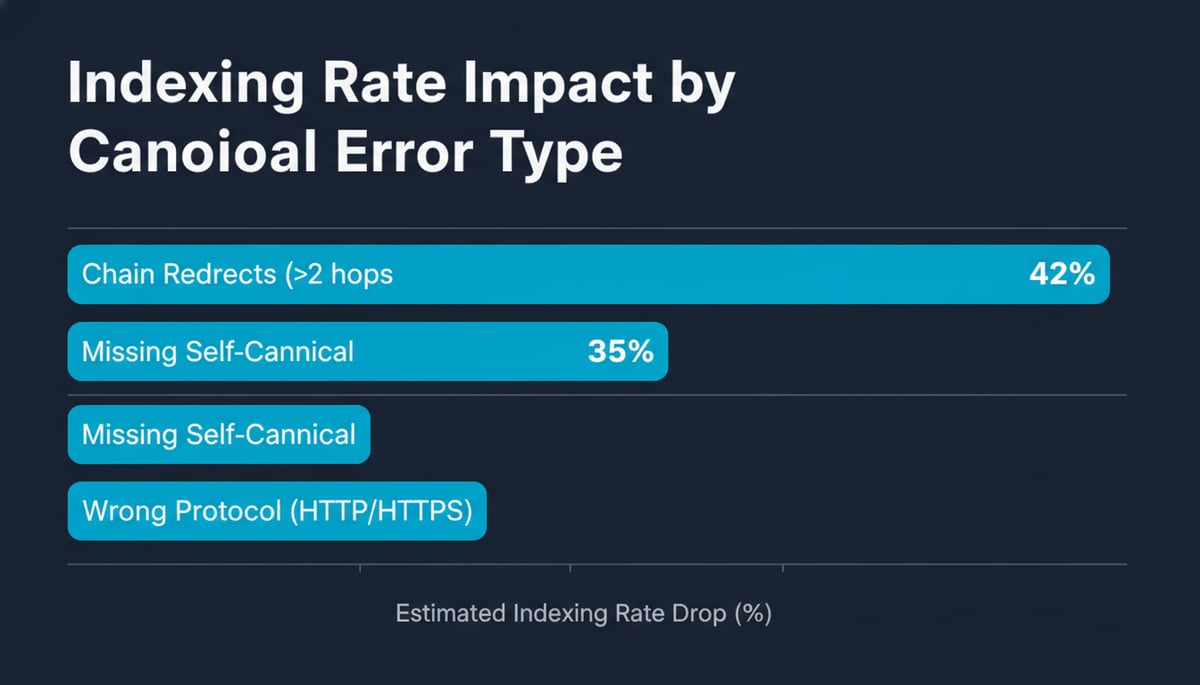
Canonical tags tell Google which version of a page to treat as authoritative. Errors here cause duplicate content issues that split ranking signals across multiple URLs and dilute everything.
Canonical audit checklist
- Every indexable page has a self-referencing canonical
- Canonical URLs use HTTPS (not HTTP)
- Canonical URLs use the correct subdomain (www or non-www)
- Paginated pages canonicalize to themselves, not to page 1
- Hreflang variants use
hreflang, not canonical - HTTP header canonicals match HTML head canonicals
- Canonical chains are not longer than 1 hop
The most expensive mistake we still see: canonicals pointing to 301-redirected URLs. If your canonical points to a URL that 301s elsewhere, Google ignores the canonical entirely and uses its own signal. Always canonical to the final destination.
6. Broken Links and Redirects
Broken links waste crawl budget and signal neglect. Redirect chains longer than 2 hops waste additional budget and slow users. Audit both in the same pass.
Redirect and broken link audit checklist
- Run Screaming Frog or Sitebulb and export all 4xx and 5xx URLs
- Categorize each 404: content moved, content deleted, typo, broken external link
- For moved content: implement a single 301 to the closest equivalent URL
- For deleted content with traffic: 301 to a relevant category page or the homepage
- For deleted content with no traffic: leave the 404, do not redirect randomly
- Resolve every redirect chain longer than 2 hops to a direct 301
- Replace broken internal links in body content, navigation, and CTAs
- Audit external broken links only for high-traffic pages
One redirect chain can waste 3 to 5 crawl visits. Multiply that across 10,000 redirected URLs and you're explaining why Google only indexes 60% of your site.
7. Site Speed and Core Web Vitals
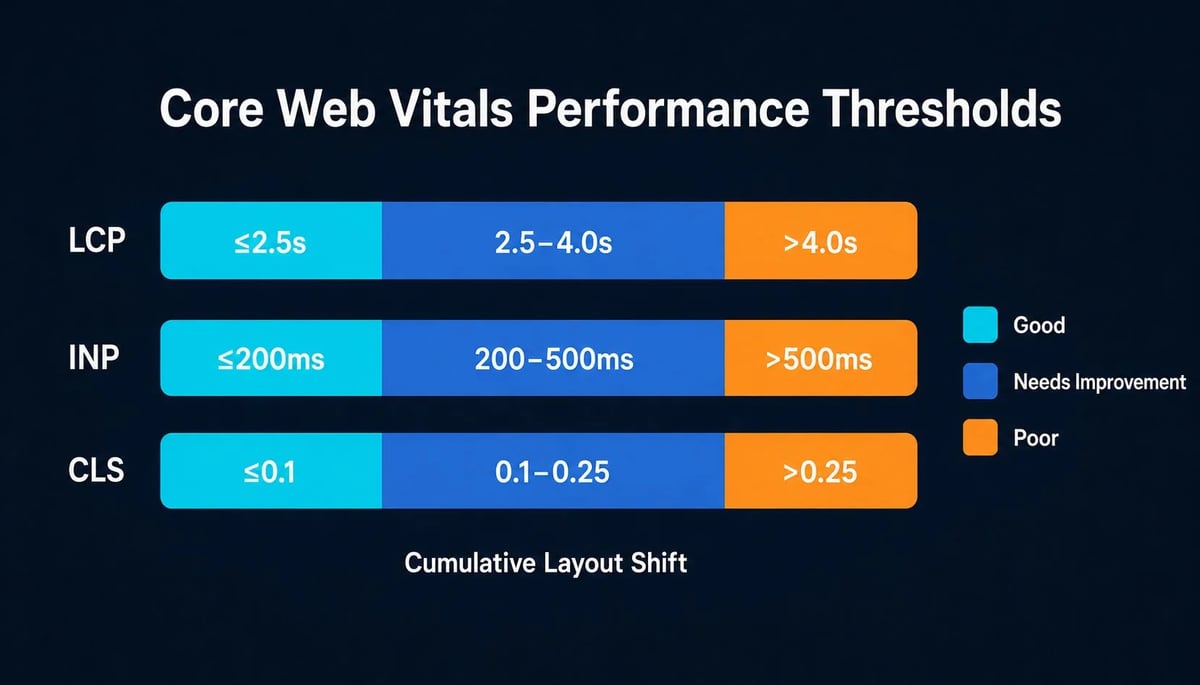
Core Web Vitals are field metrics Google collects from real Chrome users, not lab simulations. If you optimize against PageSpeed Insights lab data and ignore the field, you will pass the test and still rank poorly. Both matter, but field data is what Google's algorithm uses.
Core Web Vitals thresholds (2026)
| Metric | Good | Needs improvement | Poor | What it measures |
|---|---|---|---|---|
| LCP (Largest Contentful Paint) | ≤ 2.5s | 2.5s to 4.0s | > 4.0s | How fast the main content loads |
| INP (Interaction to Next Paint) | ≤ 200ms | 200ms to 500ms | > 500ms | How fast the page responds to clicks |
| CLS (Cumulative Layout Shift) | ≤ 0.1 | 0.1 to 0.25 | > 0.25 | How stable the layout is during load |
Google evaluates these against the 75th percentile of real user data over a 28-day rolling window. A few fast visitors don't compensate for slow ones.
Speed audit checklist
- Pull CrUX data from Search Console's Core Web Vitals report
- Compare field vs lab data. If field passes but lab fails, fix the lab issues anyway
- Identify the LCP element on every important page (hero image, H1 block, above-fold video)
- Preload the LCP image with
<link rel="preload" as="image"> - Serve next-gen formats (WebP or AVIF) with srcset fallbacks
- Defer non-critical JavaScript and load third-party scripts asynchronously
- Reduce Time to First Byte (TTFB) below 600ms with edge caching
- Reserve space for images, ads, and embeds to prevent CLS
- Replace FID-era fixes with INP-era fixes. INP replaced FID in March 2024
8. Mobile-Friendliness
Google uses mobile-first indexing. What Google sees on mobile is what Google ranks you on. Desktop-only audits are no longer sufficient.
Mobile audit checklist
- Run every important URL through Google's Mobile-Friendly Test
- Confirm tap targets are at least 48px and spaced 8px apart
- Verify font sizes are 16px or larger for body text
- Check that content parity exists between mobile and desktop (no hidden sections)
- Test horizontal scrolling. None should be required
- Validate that viewport meta tag is present and set correctly
- Confirm lazy-loaded images have explicit width and height attributes
- Verify mobile CWV scores match or beat desktop scores
Content parity is the one most teams miss. If you serve a desktop-only section with internal links, embedded videos, or schema, but hide it on mobile, Google misses those signals on its primary crawl pass.
9. HTTPS and Security
HTTPS is a baseline. Sites still serving mixed content or expired certificates take click-through hits because Chrome flags them visibly. Users notice, and so does Google.
HTTPS audit checklist
- Every URL serves 200 over HTTPS, never redirects to HTTP
- SSL certificate is valid and not expiring within 30 days
- No mixed content warnings in the browser console
- HSTS header is enabled with a max-age of at least 6 months
- HTTP to HTTPS redirects are 301, not 302 or 307
- WWW and non-WWW variants resolve to a single canonical version
- Internal links use HTTPS absolute URLs, not protocol-relative
One detail that catches teams during migrations: internal links written as //yourdomain.com/page rather than https://yourdomain.com/page. After a migration, these protocol-relative links can resolve inconsistently and cause redirect loops. Use full absolute URLs everywhere.
10. Structured Data and Schema
Structured data does not directly improve rankings. It changes how your pages appear in SERPs, which improves click-through rates, which improves rankings. Treat it as an indirect ranking lever that compounds.
Schema audit checklist
- Validate every page with schema using Google's Rich Results Test
- Cover the four core types first: Article, Organization, BreadcrumbList, WebSite
- Add Product, Review, and FAQ schema where applicable
- Confirm JSON-LD format (Google's preferred)
- Verify schema markup is in the initial HTML response, not injected by JavaScript after page load
- Cross-check schema with on-page content. Discrepancies trigger manual actions
- Monitor Search Console's Enhancements report for warnings
If your site is JavaScript-rendered, you have a separate problem. Crawlers see the initial HTML response. If your schema only exists after client-side JavaScript runs, Google may not see it at all. Use server-side rendering or static generation for schema-critical pages.
Free SEO Audit Checklist Template
Everything above collapses into this audit template. Use this free seo audit checklist template as your single-page reference, paste it into a tracker, or hand it to a junior. Each row maps to the section above.
| # | Section | Pass criteria | Tool |
|---|---|---|---|
| 1 | robots.txt accessible and valid | 200, no syntax errors, sitemap declared | GSC robots.txt tester |
| 2 | Sitemap valid and referenced | Returns 200, all URLs 200, valid schema | XML Sitemaps validator |
| 3 | Index coverage clean | No accidental noindex, no discovered-but-unindexed | GSC Pages report |
| 4 | Canonicals correct | Self-referencing, HTTPS, no chains | Screaming Frog |
| 5 | No broken links or long redirects | 0 broken internal links, 0 chains > 2 hops | Screaming Frog or Sitebulb |
| 6 | Core Web Vitals pass | 75th percentile LCP ≤ 2.5s, INP ≤ 200ms, CLS ≤ 0.1 | GSC Core Web Vitals |
| 7 | Mobile-friendly | All key URLs pass Mobile-Friendly Test | Google's Mobile-Friendly Test |
| 8 | HTTPS enforced | All URLs serve HTTPS, HSTS enabled | SSL Labs, manual redirect tests |
| 9 | Structured data valid | All schema passes Rich Results Test | Google's Rich Results Test |
| 10 | AI crawler policy set | GPTBot, ClaudeBot, OAI-SearchBot decided | robots.txt audit |
If you need help choosing which audit tools to invest in, our breakdown of the 8 best SEO software tools for agencies covers Screaming Frog, Sitebulb, Semrush Site Audit, and Ahrefs Audit in detail, with what each one does well and where each one falls short.
Frequently Asked Questions
What is the fastest way to run a technical SEO audit?
Start with Google Search Console. The Pages, Core Web Vitals, and Enhancements reports surface most critical issues without any third-party tool. Then run a Screaming Frog crawl for indexability, canonical, and redirect issues. Most teams can complete a first-pass audit on a 5,000-URL site in under 4 hours using these two tools alone.
How long does a technical SEO audit take to show results?
Indexing fixes can show up in Search Console data within 3 to 7 days. Canonical and redirect fixes typically resolve within 2 to 4 weeks as Google recrawls. Core Web Vitals improvements take a full 28-day rolling window to register in field data. Plan for 30 to 60 days between making changes and seeing ranking movement.
Can I do a technical SEO audit without coding knowledge?
Yes, for the first three sections (robots.txt, sitemaps, index coverage). Beyond that, Core Web Vitals fixes, JavaScript rendering problems, and schema implementation benefit from developer support. The audit itself does not require code. Implementing the fixes often does.
How often should one run an SEO audit checklist?
It Depends on the size and type of your website. It normally varies from quarterly to yearly. For more information read this article.
Bookkeeping for the Audit
Bookmark this checklist. Run it before every major site migration, after every CMS or theme change, and after every Google core update. The same checklist catches the same classes of problems every time, and catching them early is the difference between a 2% traffic dip and a 6-month recovery.
If you need a refresher on how often to run a full audit versus a quarterly light pass, that is covered in the FAQ of the SEO tools roundup. For now, the work is the checklist. Run it.