After auditing plenty of WordPress installs over the past year, the pattern is clear: the sites ranking on page one aren't using magic plugins. They're disciplined about foundations. They use one good WordPress SEO plugin instead of five mediocre ones, they keep their themes lean, and they treat content marketing as a system rather than a guessing game.
This guide walks through the whole stack: why WordPress is well-suited for SEO in the first place, the seven foundations every successful WordPress SEO strategy rests on, the most common problems we still see in 2026 with concrete fixes, what plugins can and can't do for you, and when it's worth bringing in WordPress SEO experts to accelerate the work.
TL;DR
- WordPress covers about 40% of the web for a reason: its publishing flexibility, plugin ecosystem, customizable URLs, themes, categories, and content management give you everything you need to compete on search.
- Rankings are decided by seven things: keyword research, site architecture, helpful content, on-page optimization, internal linking, technical health, and ongoing measurement.
- Most WordPress ranking problems are technical defaults (too many plugins, slow themes, duplicate archives, broken indexing), and each has a specific fix.
- A WordPress SEO plugin handles metadata, sitemaps, schema, redirects, and audits. Strategy, content quality, and conversion still require a human.
- Content marketing on WordPress is a system: editorial planning, blog-to-service-page journeys, regular content refreshes, and conversion paths tied to revenue.
Why WordPress Is Built for SEO (If You Don't Break It)
Before any plugin or tactic, it's worth saying out loud what WordPress gives you for free:
- Flexible publishing. Drafts, scheduled posts, revisions, and post types mean you can run a blog, a knowledge base, and a portfolio without bolting on another CMS.
- Customizable URLs. Permalinks let you ship clean, keyword-rich slugs in seconds.
/wordpress-seo-guidereads better to humans and crawlers than?p=123. - Themes and block editors. Modern block themes control every part of the layout and HTML structure, which means you can ship semantic, accessible pages without touching code.
- Categories, tags, and taxonomies. You can build a real information architecture instead of pretending every page is unique.
- Content management at scale. Media libraries, custom fields, multisite, and revisions are all built in.
None of that matters if you drown the install in 60 plugins and a poorly coded theme. The advantage is real, but it has to be earned.
The Seven Foundations of a WordPress SEO Strategy That Actually Works
A WordPress SEO strategy is just a stack of well-executed fundamentals. Skip any one of them and the whole thing wobbles.
1. Keyword Research and Search Intent
Everything starts here. The mistake we see most often is WordPress owners targeting a keyword because it sounds important, not because there's actual demand or a clear match to what their audience is searching for.
Good keyword research has four parts:
- Search volume. Real monthly demand, not vibes. Use Google Search Console for queries you already rank for, and a tool like Ahrefs, Semrush, or the free OutBlogAI Keyword Generator for new opportunities.
- Search intent. A query can be informational ("what is a WordPress SEO plugin"), commercial ("best WordPress SEO plugin for agencies"), or transactional ("buy Rank Math Pro"). The page you write has to match the dominant intent.
- Difficulty. A keyword with a 70 difficulty score is not a good target for a brand new domain. Pick fights you can win first.
- Relevance. If the keyword doesn't connect to a product, service, or expertise you actually have, skip it.
2. Logical Site Architecture
A WordPress site with 2,000 posts and no plan is a maze. Crawlers get lost, link equity gets diluted, and important pages starve.
The architecture that consistently works:
- One pillar page per core topic (WordPress SEO, WordPress hosting, WooCommerce performance, etc.).
- 5 to 15 cluster posts under each pillar, each targeting a specific long-tail query.
- A clean category and tag hierarchy that doesn't nest tags inside tags inside tags.
- A menu structure that mirrors the pillar-cluster model, with cluster posts linked from the pillar and vice versa.
If your pillar page is three clicks from the homepage, fix the navigation before you write another post.
3. Helpful, Experience-Driven Content
Google's March 2026 core update made one thing clear: content that demonstrates real experience ranks. Content that summarizes the top 10 results without adding anything new gets filtered out.
What "experience-driven" means in practice:
- Original screenshots, data, or examples from your own work.
- A clear author with verifiable expertise (the byline, author schema, and a real bio page all matter).
- Specific numbers and named tools instead of generic claims.
- Honest acknowledgment of what doesn't work, not just wins.
4. On-Page Optimization
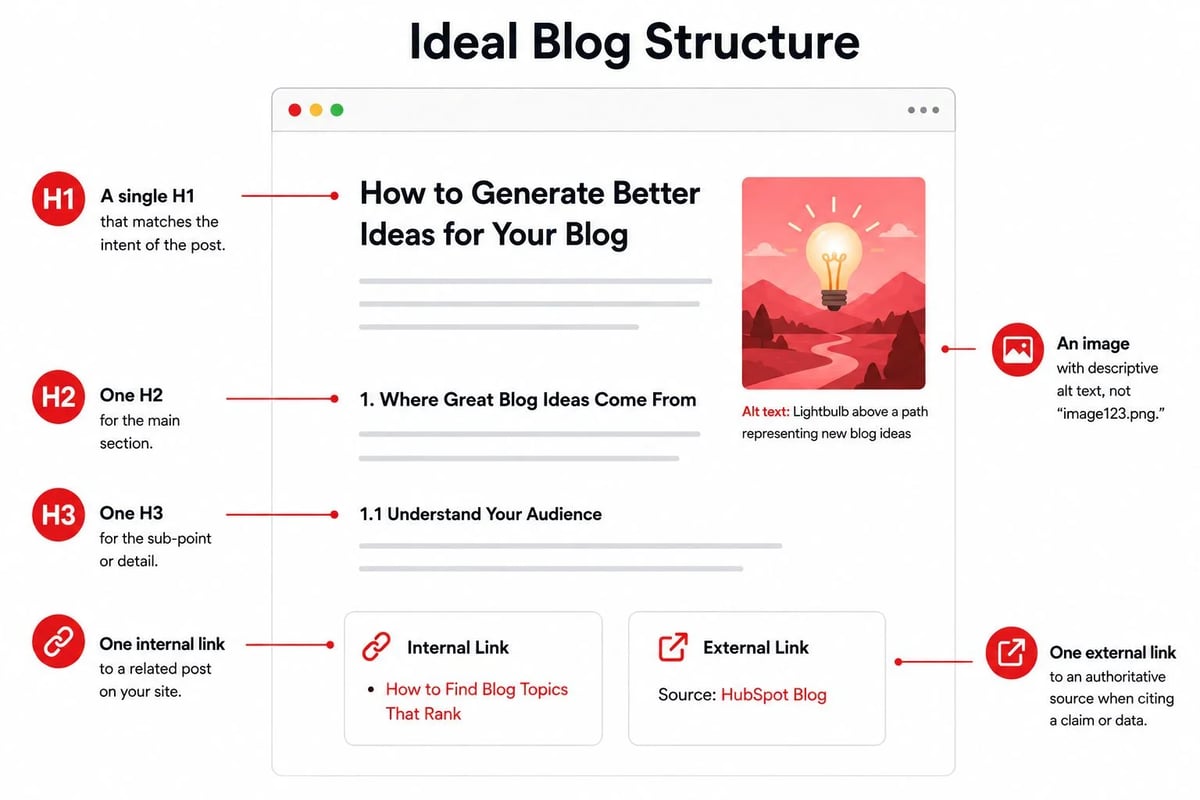
This is the boring stuff that compounds. For every post you publish:
- A single H1 that matches the intent of the title tag.
- H2s and H3s that follow a logical outline a reader can scan in 30 seconds.
- A meta title under 60 characters and a meta description under 155.
- An image with descriptive alt text, not "image123.png."
- Internal links to at least two related posts on your site.
- An external link to one authoritative source when you're citing a claim or a number.
A solid WordPress SEO plugin automates most of this. But "automates" and "decides" are different verbs. The plugin fills in templates. You decide what the page should actually say.
5. Internal Linking and Topic Clusters
Internal links do two things at once: they help crawlers discover pages, and they tell Google which pages on your site are the authoritative source on a topic.
A few rules that hold up:
- Every cluster post links back to its pillar. Every pillar links out to its cluster posts.
- Use descriptive anchor text ("WordPress SEO plugin comparison" beats "click here").
- Link generously when it's actually useful. Three internal links per 1,000 words is a reasonable floor for most content.
- Fix orphan posts (posts with zero internal links pointing at them). They're invisible to your site architecture no matter how good they are.
6. Technical SEO, Speed, Schema, and Mobile Usability
The technical layer is where most WordPress sites quietly bleed rankings. In 2026, four metrics in particular decide whether Google sees your site as healthy:
- Largest Contentful Paint (LCP) should land under 2.5 seconds.
- Interaction to Next Paint (INP) is the most commonly failed Core Web Vital in 2026, because it depends on JavaScript execution across the whole session, not just initial load.
- Cumulative Layout Shift (CLS) blows up when cookie banners, ad slots, or web fonts load after the first paint and shove content around.
- Mobile usability. Google indexes the mobile version of your site. If the mobile experience is bad, your rankings reflect that.
Add structured data (JSON-LD) so search engines can parse your pages as articles, products, FAQs, reviews, and so on. After the March 2026 core update, mismatched or inflated schema carries manual action risk, so keep the markup honest and aligned to what's actually on the page.
7. Measurement and Regular Content Updates
You can't improve what you don't measure. At a minimum:
- Track organic traffic, indexed pages, and average position in Google Search Console.
- Run a content audit every quarter and flag anything more than 12 months old with declining traffic.
- Update posts that are ranking on page two. A 10% lift in conversion on your main service page beats doubling traffic to a generic blog post.
Common WordPress SEO Problems and the Fix That Actually Works
Most of the ranking problems we see on WordPress aren't exotic. They're the same handful of issues showing up over and over. Here's how to spot them and what to do.
| Problem | What's Actually Happening | Practical Fix |
|---|---|---|
| Excessive plugins (30–80 active) | Each plugin loads CSS and JS, hits the database, and can conflict with others. Admin slows down. Core Web Vitals suffer. | Cut to the essentials: one SEO plugin, one caching plugin, one security plugin, one backup, one form, and a handful of genuinely needed utilities. Anything else is a code snippet or a SaaS. |
| Slow, bloated theme | Heavy themes add megabytes of unused CSS and JS on every page load. PageSpeed drops. Bounce rate climbs. | Switch to a lean block theme (GeneratePress, Kadence, a well-built custom theme) and audit with Query Monitor to see what's actually loading. |
| Duplicate archives | WordPress auto-generates category, tag, author, and date archives, plus pagination variants. Search engines see dozens of URLs serving the same posts. | Noindex low-value tag and date archives, noindex author archives on single-author blogs, merge overlapping categories, and let your SEO plugin handle canonicals correctly. |
| Weak internal links | Pages are isolated. Crawlers miss them, and Google can't tell which pages are authoritative. | Build a pillar-cluster model. Every cluster post links up to the pillar, every pillar links out. Aim for at least 3 internal links per 1,000 words. |
| Indexing problems | Either nothing is indexed (noindex tag accidentally on, robots.txt blocking CSS/JS) or low-value pages crowd out the important ones. | Check Coverage in Search Console monthly. Submit a clean XML sitemap. Make sure your SEO plugin isn't accidentally noindexing your money pages. |
| Outdated content | Old posts decay in rankings, lose freshness signals, and start sending readers to broken links or stale stats. | Quarterly content audit. Refresh anything more than 12 months old with declining traffic: new stats, new screenshots, current examples, updated internal links. |
If you only have time to fix one thing today, fix the plugins and the theme. They're the foundation under everything else.
What a WordPress SEO Plugin Actually Does (And What It Can't)
A good WordPress SEO plugin does five jobs, and does them well:
- Metadata. Lets you set per-post titles and descriptions without touching code.
- XML sitemaps. Generates a clean sitemap and submits it to Google and Bing.
- Schema markup. Builds the JSON-LD for articles, products, FAQs, breadcrumbs, and more.
- Redirects. Catches 404s, manages 301s when you change URLs, and warns you about broken links.
- On-page audits. Scores your content for length, keyword use, internal links, and readability.
The five plugins that actually matter in 2026 are Rank Math, Yoast SEO, All in One SEO, SEOPress, and The SEO Framework. They all cover the fundamentals. The differences are mostly in philosophy:
- Rank Math ships the most features in the free tier and a generous schema builder. It also writes a lot of custom database rows, so you need to clean up on uninstall.
- Yoast SEO is still the safest default for clients who want something familiar, with 13 million+ active installs and the longest track record.
- All in One SEO is the strongest marketing-team suite, especially if you want built-in social previews, link assistants, and integrations with tools like WooCommerce.
- SEOPress is the quiet, ad-free all-rounder. Strong value, no upsells in your admin.
- The SEO Framework wins on speed and restraint. No ads, no nags, no dashboard widgets, the leanest footprint of the five.
What the plugin does not do, no matter which one you pick:
- Decide what your business should actually rank for.
- Write content that demonstrates experience or original insight.
- Build the topic cluster model that organizes your site.
- Tell you whether your service pages are converting.
- Fix a slow host, a heavy theme, or a developer who doesn't understand Core Web Vitals.
That last list is the work. The plugin is just the tool.
WordPress Content Marketing: Editorial Planning, Refreshes, and Conversion
Most WordPress blogs fail at content marketing because they treat publishing as a content problem, not a system problem. Random posts on random topics don't compound. A planned calendar with clear ownership does.
A working editorial calendar for WordPress needs at least these fields:
- Title and target keyword with monthly volume and difficulty captured.
- Cluster or pillar the post supports.
- Search intent (informational, commercial, transactional).
- Owner (single accountable person for the next move).
- Status (Idea, Briefed, Drafting, In edit, In review, Scheduled, Published, Refresh-due).
- CTA (the specific conversion event: lead magnet, demo, service page, newsletter).
Posts planned with these fields in mind are bound to target the correct search intent, build your brand authority and untimately improve website traffic
The Blog-to-Service-Page Journey
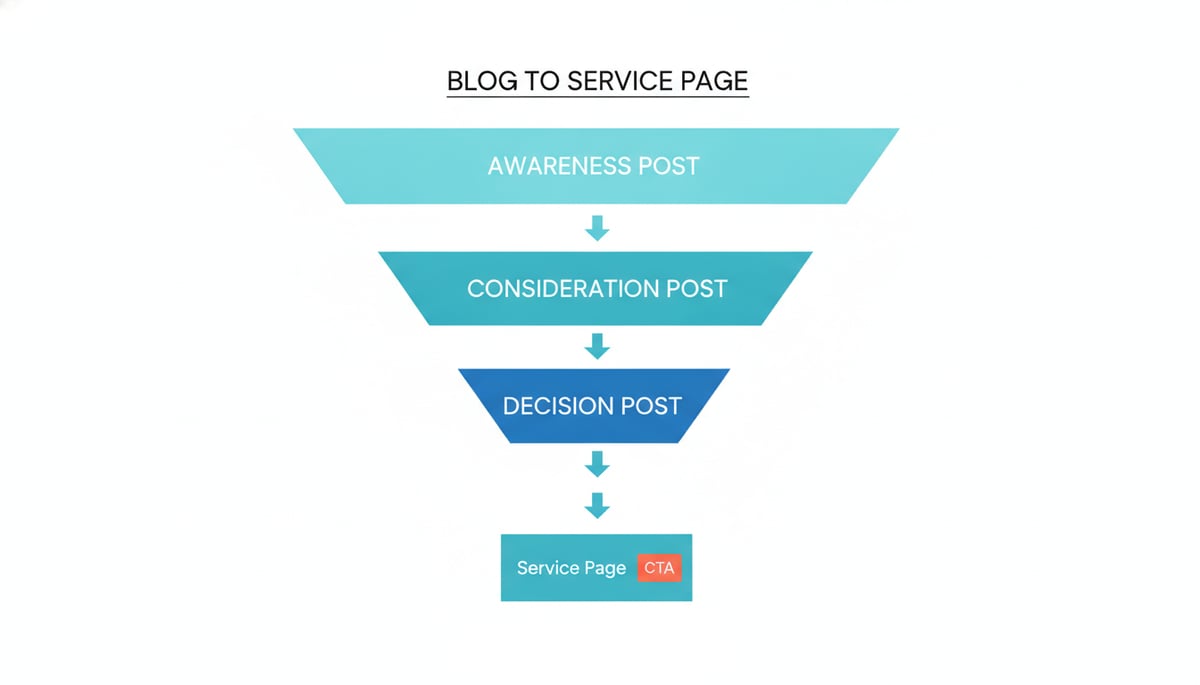
This is where most WordPress sites leave money on the table. A blog post shouldn't exist in isolation. Every post should sit on a deliberate path that ends in revenue:
- Awareness post (informational, top-of-funnel): targets a broad query and links down to a relevant service page.
- Consideration post (comparison, how-to, listicle): names the service explicitly and links to the service page with descriptive anchor text.
- Decision post (case study, deep guide, buyer-guide): pushes directly to a demo, a quote request, or a checkout.
If your blog posts don't link to a service page with intent, they're writing for traffic, not for the business.
Content Refreshes
Content marketing on WordPress isn't just "publish more." It's also "update what you already have." A practical refresh cadence:
- Every quarter, pull a list of posts more than 12 months old with declining impressions or positions.
- Pick the top 10 by traffic potential.
- Update stats, replace broken screenshots, tighten intros, add 2 to 4 new internal links, and resubmit the URL in Search Console.
- Posts that rank page two can usually crack page one with a focused refresh and a handful of new backlinks.
Conversion Paths That Actually Convert
A few rules that consistently hold up:
- One primary CTA per page. Multiple CTAs compete and lose.
- Match the CTA to the post's intent. A 4,000-word guide gets a soft CTA (newsletter, related service). A "best X for Y" comparison gets a hard CTA (demo, pricing).
- Use internal links as a CTA. Most readers will click a contextual link before they'll click a button. Both should send them somewhere useful.
When to Bring in WordPress SEO Experts
You can absolutely do most of this work in-house if you have someone who understands WordPress and SEO at a working level. There are three moments where it pays to bring in a WordPress SEO consultant, a specialist agency, or a hybrid setup:
- You're rebuilding or migrating. A migration is the single most expensive moment to get SEO wrong. URL mappings, redirect chains, schema preservation, and Core Web Vitals all need to be planned before the new site goes live.
- You've hit a plateau. Traffic is flat, rankings are stuck, and the team can't figure out why. A focused technical audit from an experienced WordPress SEO agency usually surfaces 5 to 15 fixes that compound.
- You need content at scale without losing quality. This is exactly where we built OutBlogAI. Our agent plans full editorial calendars based on your brand voice, researches each topic with original angles, and publishes directly to WordPress (along with Shopify, Framer, and Webhooks). Each integration is a 2 to 3 step process that takes about 3 minutes to set up. We've seen quality reviews consistently land at 9 or 10 out of 10 across thousands of generated posts.We have written a seperate article on how things work differently for Shopify. Consider reading: https://blog.outblogai.com/blog/en/shopify-content-marketing-2026-connected-system-guide-744393d5a02a.
For everything else, a solid in-house operator, a disciplined editorial calendar, and one well-configured SEO plugin will get you 80% of the way. The last 20% is where specialist WordPress SEO services earn their keep.
A Practical Starting Point
If you only have a weekend, here's the order to work in:
- Pick your WordPress SEO plugin. Rank Math if you want the most features free. The SEO Framework if you want the leanest install. Yoast if you want the safest default.
- Audit your plugin stack. Cut anything that's not pulling weight. Aim for under 15 active plugins.
- Run a Core Web Vitals check on mobile and desktop. Fix the worst offender (usually a heavy theme, a chat widget, or unoptimized images).
- Build one topic cluster. One pillar, five to eight cluster posts, internal links going both ways.
- Plan your next 30 days of content. One post per week minimum, each tied to a cluster, each with a clear CTA.
- Schedule a quarterly content audit. Refresh what's stale, prune what's not working, double down on what's growing.
That's the work. No plugin, agency, or shortcut replaces it. The good news is WordPress gives you everything you need to do it well, and the compounding returns show up faster than you'd think once the foundation is solid.
You can use OutblogAI's wordpress to connect your wordpress website directly to OutblogAI. This will help you publish blogs directly on your website: https://app.outblogai.com/projects/integrations/wordpress