Most Shopify stores do not have a content problem. They have a connection problem. Blogs attract readers who never reach a collection page. Collections publish product cards that rank but do not convert. Product pages sit three clicks from a buying guide that nobody links to. Traffic shows up on the wrong screen, and the store owner concludes that "content does not work for ecommerce."
That is the wrong read. Shopify content marketing in 2026 is not a writing problem or a keyword problem. It is an architecture problem. The stores earning qualified organic traffic treat every page type (blog, buying guide, comparison page, collection, product) as one connected system that mirrors how a shopper actually decides. The rest publish the same types of pages and hope Google stitches them together.
This guide walks through how that connected system works on Shopify specifically, the eight problems that quietly break it, and a workflow we use ourselves when generating catalog-scale content for stores on our CMS integration list.
TL;DR
Shopify content marketing is the practice of connecting informational, navigational, and transactional pages so the same store can earn discovery, build trust, and convert on the same organic visit. Most Shopify guides treat SEO and content as separate disciplines. On Shopify, they are a single engineering task, because Shopify locks the URL structure, the schema output, and the crawl budget behind platform decisions you cannot fully customize.
The eight problems that hold Shopify stores back:
- Thin or duplicated collection and product descriptions.
- Blogs published without a keyword or conversion purpose.
- Site architecture and internal linking that do not reflect shopper intent.
- Faceted navigation and variant URLs splitting ranking signals.
- Slow product and collection pages failing Core Web Vitals.
- Weak or partial Product and Collection schema.
- Out-of-stock and discontinued pages leaking authority.
- Content that ranks but never gets readers to a product page.
The workflow below covers how to fix each one with concrete Shopify mechanics, plus a step-by-step build sequence and one mapped customer journey example showing how an informational query becomes a sale.
Why Shopify Content Marketing Is Structurally Different
Content marketing on Shopify is not WordPress content marketing with a different domain. We actually have written a playbook for wordpress SEO content marketing as well: https://blog.outblogai.com/blog/en/wordpress-seo-2026-strategy-guide-that-actually-works-b1fde2266b1e. THere are three constraints make Content marketing on Shopify its own discipline.
First, the URL paths are fixed. Products live at /products/, collections at /collections/, blog posts at /blogs/{handle}/, and pages at /pages/. You cannot restructure subfolders or strip categories the way you can on a self-hosted CMS. Every internal linking strategy has to work within those paths. This is the reason a flat, intent-aligned collection hierarchy matters more on Shopify than almost anywhere else.
Second, the platform injects schema and metadata through Liquid templates. Most themes ship Product and BreadcrumbList schema at a basic level. Few ship complete Review, FAQ, and Merchant Listings schema. The gap is rarely a platform flaw. It is a configuration gap, and it is the difference between a plain blue link and a rich result with price, availability, and stars.
Third, the blog is a separate app from the storefront. Posts in /blogs/ do not inherit the same conversion scaffolding as collection and product pages. A blog post has to be deliberately pointed at commerce through in-content links, comparison tables, and product embeds. Without that, the blog functions as a separate publication that Google treats generously and humans exit without buying.
These are the reasons generic "write more blog posts" and generic "fix your meta descriptions" advice underperforms on Shopify. Both ignore the architecture.
Customer Journey On Shopify, Mapped by shopify SEO experts
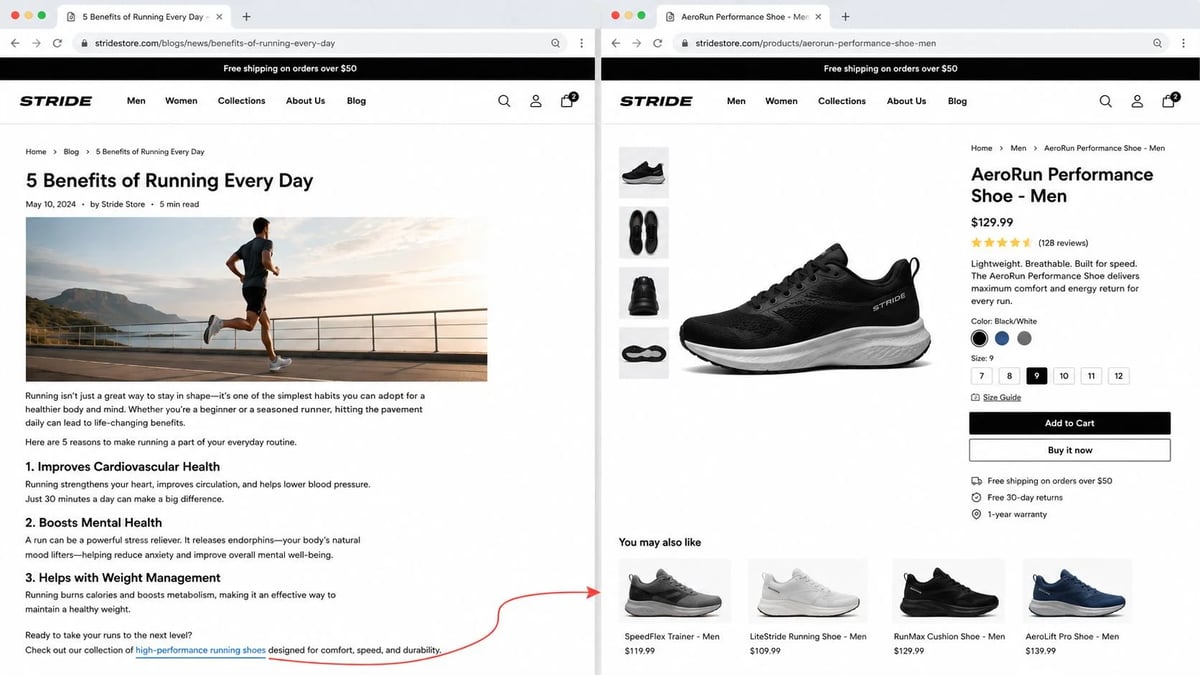
Every piece of content on a Shopify store plays one of four roles in a buying decision:
| Stage | Search intent | Page type | Conversion job |
|---|---|---|---|
| Discover | "what is," "how does," "is X worth it" | Blog post, explainer | Build topical authority, capture branded queries |
| Compare | "X vs Y," "best X for [use case]" | Buying guide, comparison page | Move reader from options to a shortlist |
| Browse | "X for sale," "[category]" | Collection page, sub-collection | Sort, filter, evaluate the catalog |
| Buy | "[brand] [product]," SKU searches | Product page | Close the sale, capture review for re-entry |
Most Shopify stores only invest in stage one and stage four. They write blog posts for discover traffic and rely on product pages to convert. The middle two stages are where a competitor with a connected content system pulls ahead. A reader who lands on a comparison page stays on the site longer, sees curated product selections, and clicks into a collection filtered to exactly what they were searching for. Without that bridge, the blog reader bounces and the collection visitor sees an undifferentiated grid.
The fix is not more content. The fix is fewer, better-connected pieces. One comparison page that links to three collections and five product pages will outperform five thin blog posts that link to nothing.
Eight Problems, And The Shopify Mechanics That Fix Them
1. Thin or duplicated collection and product content
Shopify themes often generate collection descriptions from a single textarea that store owners leave blank. The result is a grid of products with a header and a footer and no body content for Google to index. Product descriptions imported via CSV are frequently repeated across variants, or copied from a supplier sheet that four other stores use verbatim.
The fix is platform-specific. Write a 100 to 200 word unique intro for every priority collection page above the product grid. Use it to answer the specific intent of that collection (for example, "running shoes for overpronation," not just "running shoes"). For product descriptions, write them as if a customer is asking detailed questions, not as if a supplier is filling spec fields. Describe materials, use case, who it is for, who it is not for, and how it compares to the next item in the catalog.
2. Blogs published without a keyword or conversion purpose
A blog post that has no target query, no next click, and no connection to a product is a liability in 2026. AI Overviews now appear on roughly 48 percent of Google searches and organic CTR on queries with AI Overviews dropped to 1.3 percent at its lowest point in late 2025, recovering to 2.4 percent by early 2026 (Seer Interactive, 2026 CTR study). For Shopify stores, that means pure informational content earns less traffic than it did two years ago.
The point of a blog post is no longer to rank for one query and hope for a click. It is to enter the conversation at the discover stage, then route the reader to a comparison page or collection that ranks and converts. Every blog post should answer three questions before publishing: which query does this rank for, which collection does the reader land on next, and which product is the obvious recommendation.
3. Site architecture and internal linking that do not reflect shopper intent
A flat collection structure matters more than people think. Products buried more than three clicks from the homepage accumulate less authority, and orphaned pages drop out of indexing over time. The same applies to blog posts. A blog that lives at /blogs/news/ without contextual links from collections and product pages gets crawled less and ranks worse.
The fix is deliberate linking, not just "more links." Every blog post should link to at least one collection and one product page. Every collection page should link to the sub-collection that organizes its products by use case. Every product page should link to one buying guide and one related product. You are not building a web. You are building a funnel that has multiple entry points.
4. Faceted navigation, duplicate URLs, and canonical issues
Collection filters and variant selectors generate URLs that can balloon fast. A category page with eight filter dimensions can produce tens of thousands of parameter combinations, most with no original content and no search demand (Scandiweb on ecommerce duplicate content). Shopify now recommends Storefront filtering, which uses product data rather than tag-based URLs, partly because tag pages have historically been a duplicate-content source.
The fix starts with classification. Not every filter URL deserves to be indexed. Some are useful only for shoppers, some warrant canonical consolidation to the parent collection, and some (sort orders, multi-filter combinations, empty result pages) should not be in your sitemap or internal linking at all. Shopify does not give you granular indexation control on parameter URLs the way a custom CMS does, which is why the choice of which collections, sub-collections, and tag pages actually live in your navigation is the highest-leverage architecture decision you will make.
5. Slow pages and Core Web Vitals
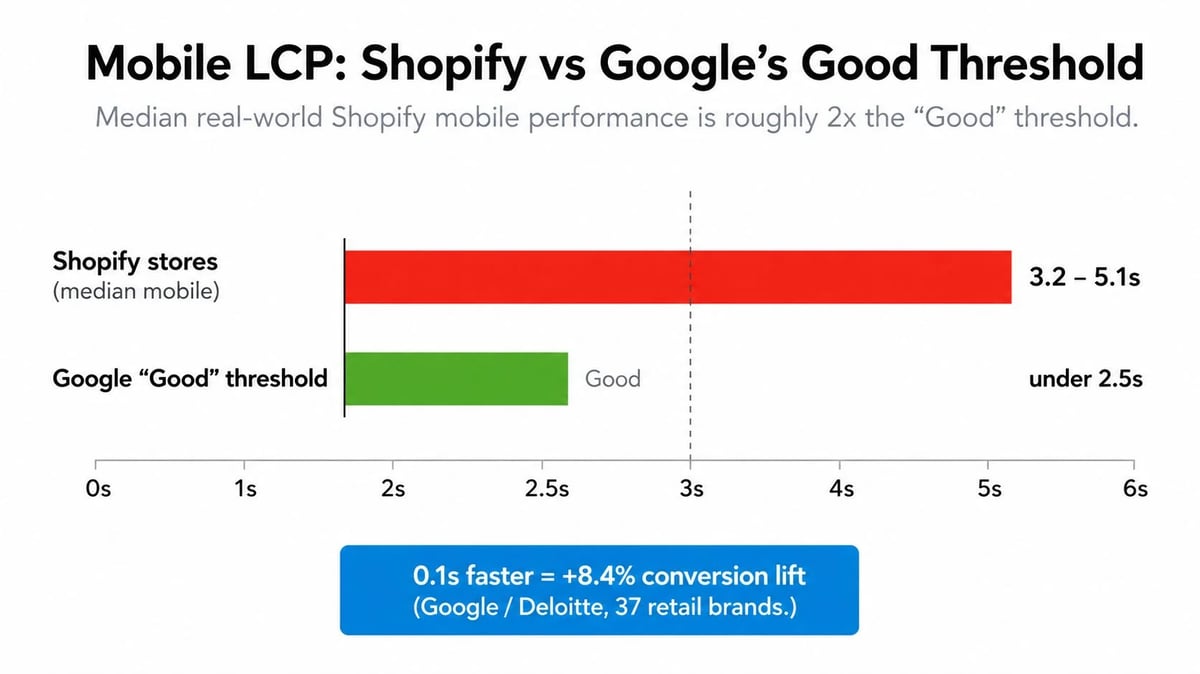
The median Shopify store still sits between 3.2 and 5.1 seconds Largest Contentful Paint on mobile, above the 2.5 second "Good" threshold (Scandiweb performance study, 2026). Stores with heavy third-party app stacks frequently see Interaction to Next Paint above 500ms, deep into Google's "Poor" range. CLS issues persist from late-loading app banners and cookie consent bars (1Digital Agency, August 2026).
The practical fixes are tactical. Audit installed apps every quarter and remove anything that does not tie to measurable revenue. Switch theme image filters from the legacy | img_url to | image_url with a format parameter so Shopify's CDN serves WebP and AVIF. Add a <link rel="preload"> tag for the LCP image (usually the hero or first product card). Set explicit width and height attributes on every product image to prevent CLS. Lazy-load reviews, upsells, and chat widgets until after the page has been idle for two seconds.
A 0.1 second improvement in mobile load time has been measured at 8.4 percent conversion lift (the Google / Deloitte benchmark across 37 retail brands and 30+ million sessions keeps holding up in practice). On a Shopify store doing a few hundred thousand in monthly revenue, that is real money.
6. Weak or partial Product and Collection schema
Shopify's built-in theme schema covers Product and BreadcrumbList at a baseline. It rarely ships complete Review, FAQ, Offer, AggregateRating, or Merchant Listings schema unless the theme developer built them in (AdNabu schema guide, 2026). A store with stars, pricing, stock status, and review counts visible on search is leaving that real estate on the table.
The fix is to map which schema type each page needs. Product pages should output full Product JSON-LD with name, image, description, brand, sku, offers (price, priceCurrency, availability, url), and aggregateRating if reviews exist. Collection pages can output ItemList and BreadcrumbList. Buying guides and FAQ sections on product pages should output FAQPage. After implementation, validate every template type in Google's Rich Results Test and Schema Markup Validator.
7. Out-of-stock and discontinued products
There are three Shopify-specific cases, and each handles differently.
For a temporarily out-of-stock product, keep the page live, show a clear "Sold Out" or "Back Soon" message, and offer an email or SMS back-in-stock signup. Do not redirect. The page has historical authority and the search demand has not disappeared, it is just delayed.
For a permanently discontinued product, the answer depends on whether there is a replacement. If there is a real equivalent (same category, similar price, similar use case), 301 redirect the discontinued URL to the replacement product. If there is no real equivalent but the product still receives traffic or has external links pointing to it, keep the URL live with a "Discontinued" notice and links to alternatives within the same collection. If there is no traffic, no links, and no replacement, a 404 or 410 response code is honest and avoids passing thin authority forward.
Never redirect a discontinued product to the homepage. That sends a noisy signal and breaks the user experience. Also avoid 302 redirects for permanent moves. They preserve ranking signals less reliably than 301s. (Orbit Media on out-of-stock ecommerce SEO).
8. Content that attracts traffic but never converts
The most common reason content underperforms on a Shopify store is that the in-content links are weak. A blog post ending with "Browse our collection" links to the broadest possible page on the store. The reader has to start their buying journey over again.
The fix is anchor specificity. Instead of "browse our running shoes," link the phrase "the stability running shoes in our overpronation collection" directly to /collections/overpronation-running-shoes. Instead of "see our products," link "the trail-ready hiking backpack we recommend for weekend trips" to the specific product page. Anchor text carries intent and ranking signal at the same time. Broad anchors waste both.
Workflows Used Shopify SEO Agencies
This is the sequence we use ourselves when scaling blog, buying guide, comparison, and collection content on stores connected to our CMS pipeline. The same sequence works if you run content internally or work with a Shopify SEO agency. The tools change, the order does not.
Step 1: Keyword research with intent buckets
Start every month with a keyword research pass organized by stage in the customer journey, not by topic cluster. Separate informational ("how to choose a yoga mat"), comparison ("lululemon vs manduka yoga mat"), category ("yoga mats"), and brand queries ("brand X yoga mat"). The volume distribution looks different for every store, but the buckets force every keyword into a decision about which page type it belongs on.
Pull from three sources. Google Search Console shows what your store already ranks for. A standard keyword tool (Ahrefs, Semrush, or free alternatives) shows what competitors rank for. Reddit, Quora, and category forums show the actual questions shoppers ask. The third source is the one most stores skip, and it is the source that produces content readers finish.
Step 2: Search intent mapping
For each target query, classify the intent in one sentence. "Best hiking shoes for wide feet" is comparison intent with sub-intent for fit guidance. The page that ranks is a comparison page that includes fit information, not a product page and not a generic blog post. Get this wrong, and the page fails before it is written.
A simple rule: if the SERP shows mostly product pages and collections, your collection or product page is the right target. If the SERP shows mostly guides and listicles, your blog or buying guide is the right target. If both are present, you have a choice and you should write the page that matches the strongest intent weight.
Step 3: Content mapping to page types
Every target keyword now has a destination page. Some destinations are new, some are existing pages that need to be expanded or rewritten. Build a content map that lists every page, the primary query, the secondary queries, and the internal links it must contain. Update this map monthly. It is the single most useful document in a Shopify content operation, because it forces every page to justify itself in the system.
Step 4: Creation with platform-aware briefs
A Shopify content brief is not a generic SEO brief. It includes the target page type, the destination URL, the anchor text for at least three internal links, the schema markup the page should output, the LCP image and its preload status, and the conversion path the reader should take after reading. Briefs that omit these fields produce content that has to be retrofitted after publication, which means the retrofit often does not happen.
For stores generating content at scale, this is where automation earns its place. OutBlogAI's agent runs a similar sequence when generating posts for connected Shopify stores: it matches the brief template, drafts the post in 7 to 15 minutes, runs a quality review (typical scores 9/10 or 10/10 on our internal rubric), and publishes through the CMS integration in under 5 seconds. The point of the automation is not to skip human review. It is to keep briefs, internal links, schema, and publishing consistent across hundreds of posts, which is hard to maintain manually and easy to drop.
Step 5: On-page optimization
For a blog post, that means a single H1 containing the target keyword, two to four H2s organized around sub-questions, an opening paragraph that answers the primary question directly, and the target keyword naturally used in the first 100 words, one H2, and one meta description. For a collection page, the unique intro paragraph, a clear H1, the product grid, and supporting copy beneath it explaining use case, fit, material, and what is in stock. For a product page, the title, a description that addresses who the product is for, the spec block, the review block, and the FAQ block if applicable.
Avoid stuffing. The minimum on-page optimization that wins in 2026 is straightforward. Anything beyond it reads as keyword insertion.
Step 6: Internal linking with intent, not volume
Internal links should mirror the customer journey, not random anchor distribution. The pattern that works:
- Every blog post links down the funnel to one buying guide or comparison page.
- Every comparison page links across to one or more collections.
- Every collection page links across to related collections and down to priority product pages.
- Every product page links up to the buying guide and across to related products.
This is a four-tier web that matches how readers actually move through your store. It is also the structure Google's crawlers can follow most efficiently.
Step 7: Schema and structured data
Once content is published, validate the schema on each page type using Google's Rich Results Test. Fix warnings before fixing anything else. If Product schema is incomplete on your top-selling pages, that is a bigger issue than a missing H3.
Step 8: Measurement with revenue, not sessions
Track three numbers per page. Organic sessions to the page. Add-to-cart rate from the page. Conversion rate attributed to the page (last-click and assisted). Sessions alone are vanity during the AI Overview era. A blog post that gets 5,000 monthly sessions and contributes zero assisted conversions is being correctly deprioritized by Google over time. A product page with 1,000 sessions and a 3 percent assisted conversion contribution is doing real work and should be reinforced with more internal linking, more comparison content, and more schema.
Pull this data from Google Analytics 4 with the conversion path report, paired with Search Console's landing page report, every 30 days. Combine the two to see which content contributes revenue and which only earns clicks.
Step 9: Updates and pruning
Content marketing is not a publishing program. It is a maintenance program. Schedule a quarterly review of every published page. Pages that rank and convert get fresh data, new internal links, and updated schema. Pages that rank but do not convert get rewritten with stronger CTAs and intent-matching links. Pages that do not rank and do not convert get consolidated into the page they should have been, or removed with a 301 redirect to the relevant collection.
This is where most stores stop. They publish and they wait. The stores growing organic revenue in 2026 are the ones still editing content from two years ago.
One Mapped Journey: From Blog Query To Sale
Consider a store selling running shoes. Their target queries include "best running shoes for flat feet," "running shoes for overpronation," and "stability vs neutral running shoes."
Here is how the connected system looks for the query "best running shoes for flat feet."
Step 1: Discover. A blog post titled "What Flat Feet Mean for Runners (And What Shoes Actually Help)" lives at /blogs/news/flat-feet-running-shoes. It opens with a direct answer about overpronation and gait, includes a 150-word section on shoe type selection, and links with specific anchors to two destinations: the comparison page and the overpronation collection.
Step 2: Compare. The comparison page at /blogs/news/best-running-shoes-for-flat-feet-2026 ranks for the comparison query. It opens with a one-paragraph verdict (three picks, with reasoning), then a table comparing the top eight shoes by weight, drop, support type, and price. Each row links to the specific product page. Below the table, a section links to the overpronation collection for readers who want to filter the full catalog.
Step 3: Browse. The overpronation collection at /collections/overpronation-running-shoes opens with 120 words of unique intro explaining the support technology, the gait pattern it addresses, and how sizing runs. The product grid shows the curated list. Sub-collection links point to "max cushion overpronation" and "trail overpronation."
Step 4: Buy. Each priority product page at /products/{handle} includes the full Product schema, a 250-word description that addresses who the shoe is for, the spec block, the review block with aggregateRating schema, an FAQ block with FAQPage schema for "how does the sizing run" and "is this good for daily training," and an internal link back up to the comparison page and across to the next-best product.
The internal linking graph. The blog post points to the comparison page. The comparison page points to the collection and three product pages. The collection points to priority products and the comparison page. The product pages point back up to the comparison page and across to related products. A reader can enter from any of the four page types and move forward or backward through the system without hitting a dead end.
The schema graph. The product pages have Product schema that uses @id matching the canonical URL of the product. The collection has ItemList schema with itemListElement referencing the canonical product URLs. The comparison page has BreadcrumbList schema that mirrors the navigation. Search engines and AI systems can resolve every entity in the graph to a single canonical URL.
This is what a working Shopify content marketing system looks like in practice. It is not a publishing volume problem. It is a connection problem solved once at the architecture level and maintained quarterly.
When To Call For Shopify SEO Services
Most Shopify store owners can run the workflow above internally if they have a content lead with SEO experience. Three situations point toward outside help.
You are launching or rebuilding a catalog of 1,000+ SKUs and need technical SEO cleanup at the same time as a content program. That is the case where a Shopify SEO agency earns its keep, because the cleanup work (canonical audit, faceted navigation decisions, schema implementation, redirect mapping) is one-time and high-stakes.
You have the content production running but the operational layer is breaking. Editorial calendars slip, briefs lose their internal link logic, schema breaks when the theme updates, and product page rewrites never happen. A Shopify SEO expert embedded with your team can stabilize the pipeline without taking over content decisions.
You are competing in a category where the top three competitors are publishing 20+ pieces of content per month with original research, expert contributors, and consistent updating. That scale is hard to maintain internally without an automation layer for briefs, internal linking, and publishing. OutBlogAI was built for stores in this position, but the same role is filled by any system that standardizes brief production, enforces schema on every post, and pushes directly to Shopify in under a minute.
When evaluating Shopify SEO services or Shopify SEO experts, ask three questions that separate operators from sellers. Can they show a site architecture diagram for a store they have shipped, not just traffic graphs. Do they have a documented workflow for content briefs that includes internal link logic, schema, and conversion path. Can they show the revenue contribution of the content they have produced, not just rankings.
What To Do This Week
If you only have one week to start fixing your Shopify content marketing, here is the order:
- Write or rewrite 200 words of unique copy for the top three collection pages by traffic.
- Pick the ten highest-traffic blog posts and add a specific internal link from each to a relevant collection page.
- Audit the Product schema on the top 20 product pages by revenue and complete any missing fields (price, availability, aggregateRating).
- Run a PageSpeed Insights check on the home page and the top three product pages. Fix the LCP image, set width and height on every image, and remove or defer one heavy app.
- Map one customer journey from a search query to a specific product sale. If the path through your store does not exist, build it.
These five moves will not fix every problem on this page, but they will produce the first compounding effect. Organic traffic that converts has always been a system. The system starts at the connection between content and commerce, on a Shopify store, this week.
OutBlogAI publishes content directly to Shopify along with WordPress, Framer, Notion, Wix, Ghost, Medium, Substack, Squarespace, and Webflow. Setup is a 2-3 step process that completes in about 3 minutes per CMS, with publishing latency under 5 seconds after generation. Posts are generated in 7-15 minutes per piece and pass through a quality review that scores 9/10 or 10/10 on our internal rubric before they go live on a connected store. Start a free trial at outblogai.com.
If you want to connect your shopfy store directly to OutblogAI, you can use our blugin for a simple 5 minute integration: https://app.outblogai.com/projects/integrations/shopify