Google Spam update August 2026
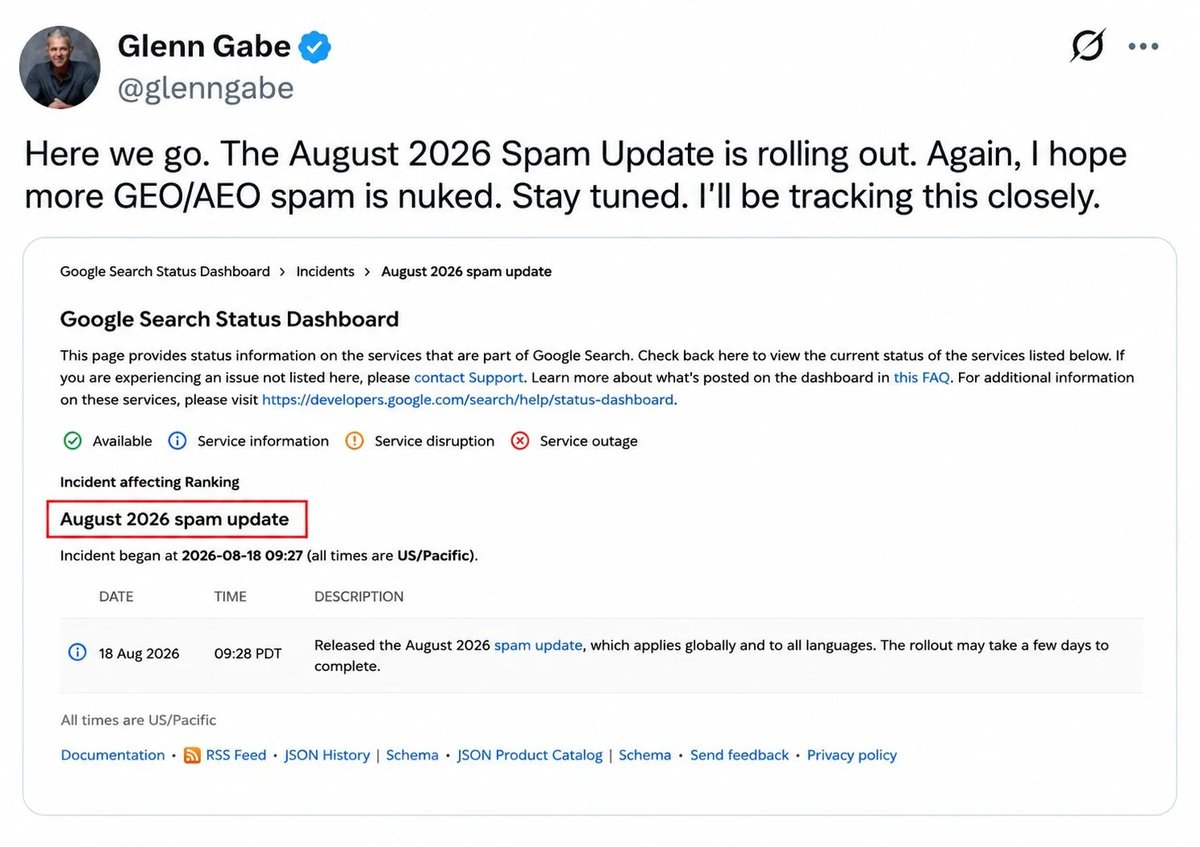
The Google August 2026 spam update finished rolling out on August 21, 2026, about two and a half days after it began. Google's official Search Status Dashboard records it as starting on August 18, 2026 at 9:27 a.m. Pacific Time and ending on August 21, 2026 at 1:49 a.m. Pacific Time, a total of roughly 2 days and 16 hours. The update applied globally and to all languages, and Google did not introduce any new spam policies or publish a companion blog post with the rollout.
If your traffic dipped between August 13 and August 21, this guide will help you tell three things apart: a known Google Search Console logging error that hit AI-generated reporting, the spam update itself, and ordinary ranking noise. We will walk through what Google has officially confirmed, what industry observers are reporting, why a traffic drop alone does not prove a penalty, the exact Google Search Console audit to run, a recovery checklist, what not to do, and realistic recovery timelines. Throughout, we keep Google-confirmed facts separate from industry observations so you can decide what to act on.
What the Google August 2026 Spam Update Actually Changed
Google's confirmed facts
These are the details Google has put on the record directly.
- Start and end times. Released August 18, 2026 at 9:28 a.m. PDT. Rollout complete August 21, 2026 at 1:49 a.m. PDT as mentioned by the Google Search Status Dashboard incident page.
- Scope. Global, all languages. Google's release note said "applies globally and to all languages."
- Type. Google described this as a "normal spam" update with nothing specifically new, according to Search Engine Land's coverage of Google's confirmation.
- No new policies. Google did not publish new spam policies or a blog post alongside this rollout. The current Google spam policies for web search are still the rules of the road.
- Position in 2026. It is the third spam update of 2026, following March and June. Search Engine Journal's coverage places it in that sequence.
Industry observations (not Google-confirmed)
Below is what SEO tools, publishers, and analysts have been reporting since the rollout. We are flagging these as observations, not facts.
- Volatility was sharp. Tracking tools recorded large ranking swings concentrated in the rollout window, especially for sites relying on heavily automated publishing or scraped content.
- Common pattern among affected sites. Observers describe clusters of pages with thin differentiation, templated structures, low original value, or programmatic generation at scale. Google has not confirmed any specific tactic as a target.
- Some legitimate sites saw movement. Several SEOs reported traffic loss on pages that do not match known spam patterns. Google's spam update documentation explicitly warns that "there will always be cases of sites not spamming Google that get hit by a spam update."
If you are sorting signal from noise, keep these two categories straight. Confirmed facts come from Google. Patterns and observations come from third parties, including us.
How Google's Spam Updates Work
Google's spam updates are not magic. They are improvements to SpamBrain, Google's AI-based spam-prevention system. The official spam updates documentation explains that Google occasionally makes "notable improvements" to how its automated systems catch spam, and shares those moments on the Search Status Dashboard.
A few things follow from that definition:
- Spam updates target policy violations, not quality. If a page lost rankings because Google simply thinks another page is more helpful, that is a core update behavior, not a spam update behavior. A spam update is about enforcement of Google's published spam policies.
- The systems learn over time. Google's docs state that "making changes may help a site improve if our automated systems learn over a period of months that the site complies with our spam policies." That is why recovery feels slow.
- Link spam updates are different. If Google removes the ranking effect of spammy inbound links, any past benefit from those links cannot be regained. The August 2026 update was not announced as a link spam update.
The Google spam policies for web search are the rules these updates enforce. As of the May 15, 2026 update, they cover cloaking, doorway abuse, expired domain abuse, hacked content, hidden text and links, keyword stuffing, link spam, machine-generated traffic, malware and malicious practices, misleading functionality, scaled content abuse, scraped content, site reputation abuse, sneaky redirects, and thin affiliate pages.
Why a Traffic Drop Alone Does Not Prove a Penalty
This is the single most important point in this article. A drop in Search Console impressions or clicks around August 18 to 21 does not automatically mean your site was penalized by the spam update. Several other things happened in the same window.
The mid-August Search Console logging error
Google confirmed a separate reporting issue affecting the Generative AI performance report in Search Console from August 13 through August 17, 2026. Google said the issue affected data logging only, not actual search visibility. A related issue also affected Google Discover reporting on August 13.
If you saw a sharp decline in AI Overview or AI Mode impressions around August 13 to 17, you may be looking at a logging bug, not a ranking change. Coverage of this logging error and how to separate it from the spam update is documented at Q-Tech's analysis of the August 2026 logging error and spam update.
Ordinary day-to-day fluctuation
Rankings move every day. Single-day or even three-day movements during an update rollout are not always caused by the update itself. Industry coverage of the August 2026 spam update consistently recommends letting data settle for several days before drawing conclusions.
Algorithm change without manual action
A drop tied to a spam update is not the same as a manual action. Manual actions show up in Search Console under Security and Manual Actions. Algorithmic effects do not. If you have no manual action, you do not have a penalty to file a reconsideration request for. Your job is to bring content into compliance and let Google's automated systems re-evaluate.
The diagnostic checklist below is built around this distinction.
Side-by-side: Search Console logging error vs the August 2026 spam update
If you are staring at a Search Console chart and trying to decide which event you are looking at, use this comparison to triage.
| Signal in your data | Logging error (Aug 13 to 17) | Google August 2026 spam update (Aug 18 to 21) |
|---|---|---|
| What it actually changed | Data logging only, in the Generative AI performance report and parts of Discover | Google's automated ranking systems |
| Filter in Search Console affected | Generative AI filter, AI Overview, AI Mode impressions | All filters, all queries, all devices |
| Actual user-visible traffic | Unaffected, Google says | Potentially affected if rankings changed |
| Typical pattern | Sharp drop in AI-related impressions, stable clicks and conversions | Broader movement across queries and pages |
| Best response | Document the anomaly, treat those dates cautiously | Audit content against spam policies and wait for re-evaluation |
The Google Search Console Audit: 7 Checks Before You Change Anything
Run these checks in order. Do not skip steps.
1. Compare Performance before and after the rollout
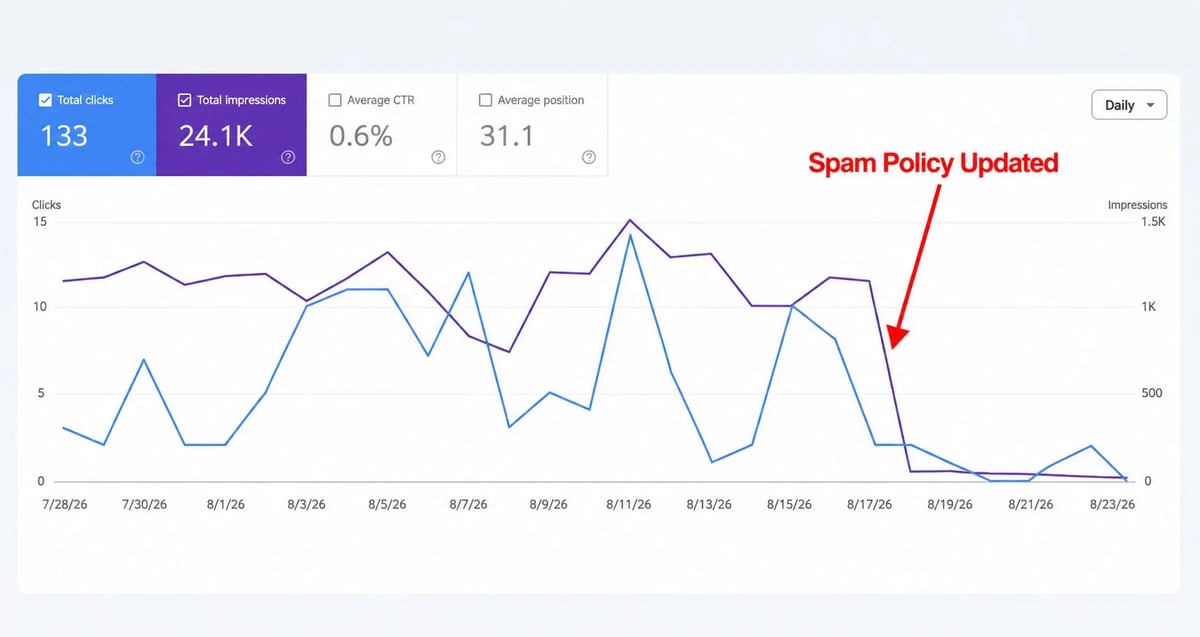
Open Google Search Console, go to Performance, and filter by date. Compare a 7-day window before August 18 with a 7-day window starting August 18. Look at total clicks, total impressions, average CTR, and average position.
Key checks:
- Is the drop concentrated in queries starting "Generative AI" or in the AI filter view? That points more toward the logging error than the spam update.
- Is the drop broad across queries and pages, or narrow to a specific template? Broad movement across many templates is more consistent with an algorithmic effect.
- Are impressions down but clicks and position stable? That looks more like a reporting change.
2. Identify the specific pages and queries that lost ground
Still in Performance, switch to the Pages tab and the Queries tab. Sort by click delta or impression delta.
Look for patterns:
- A handful of pages with template-like URLs taking the hit.
- Queries that match commercial or transactional intent, where low-value pages often cluster.
- Devices or countries where the drop is concentrated.
This is also where you separate the spam update from the logging error. The Q-Tech analysis observed cases where reported Generative AI impressions dropped around 33 percent while actual conversions held steady. If your business metrics did not move, the GSC line might be telling you about a reporting change, not a traffic change.
3. Verify indexing status
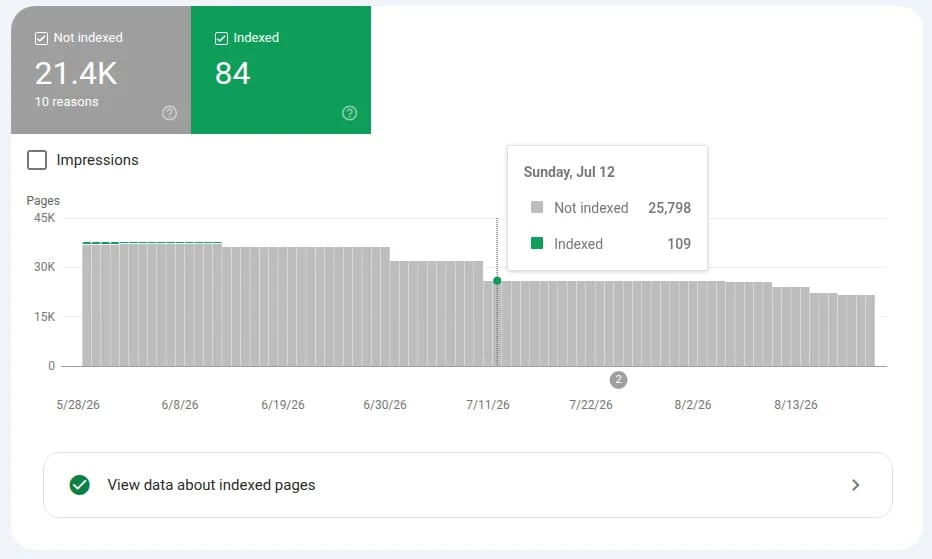
Open Pages, then Indexing. Make sure the pages you care about are still indexed and not blocked by a noindex tag, robots rule, or a coverage exclusion. A page that falls out of the index during an update is in a different situation than a page that drops in rankings.
If a page is suddenly showing "Crawled, currently not indexed" or "Discovered, currently not indexed" for a large number of URLs, that is its own investigation.
4. Check Manual Actions
Go to Security and Manual Actions, then Manual Actions. If you have a manual action, you will see it here with a description of the policy area and example URLs. Google's guidance on how to use this report is documented at Search Engine Journal's guide on manual action reports.
If you see no manual actions, you are dealing with an algorithmic effect, not a penalty. The right move is different.
5. Check Security Issues
Same section, Security Issues. Hacked content is one of the spam policies Google actively enforces. If your site has been compromised and is serving injected pages, links, or redirects, those pages can trigger spam signals even if the rest of your site is clean. The Google spam policies page describes code injection, page injection, content injection, and malicious redirects as common hacked content patterns.
6. Review your links
Open Links, then External Links and Internal Links. Look for:
- Sudden spikes in new external links pointing at pages you did not promote.
- Inbound links from obviously off-topic or low-quality sources.
- Internal links to pages that no longer exist, or that are now redirected.
Spam updates do not always announce themselves as link spam updates, but link patterns still matter when you audit impact.
7. Use URL Inspection on your most affected URLs
Pick the 5 to 10 pages with the largest impression or click drops. Run each through URL Inspection. Confirm:
- The URL is indexed.
- The canonical is what you expect.
- The page renders the same content Google is seeing.
- There is no "Coverage" issue blocking it.
If URL Inspection looks normal but rankings have fallen, the issue is not the page itself. It is how Google's systems are weighing it against the rest of the web for your queries.
Recovery Checklist: What to Fix and in What Order
Once you have completed the audit, prioritize fixes in this order.
- Clean up any spam policy violations first. If any audit step surfaced cloaking, hacked content, hidden text, doorway pages, expired domain abuse, or scaled content abuse patterns, fix those before anything else. The Google spam policies for web search are the rules the systems are enforcing.
- Remove or noindex low-value template pages. Programmatic pages that exist mainly to capture long-tail queries with no original value are the kind of pattern observers flagged during this update.
- Consolidate overlapping content. If multiple pages target the same query with thin differentiation, merge them into a single authoritative page and redirect the others.
- Add real expertise signals. First-hand experience, named authors with verifiable credentials, primary sources, original data, and case examples all raise the floor on content quality.
- Fix hacked content and security issues. If your Security Issues report shows anything, address it before submitting anything for reconsideration.
- Document what you changed. A simple change log with dates, URLs affected, and what you did will make future updates easier to diagnose.
- Resubmit affected URLs for indexing through URL Inspection once major fixes are live.
- If you have a manual action, follow Google's guidance to fix it and then use the "Request Review" button. Do not submit a reconsideration request without an action.
What Not to Do
A few common reactions cause more harm than the original drop.
- Do not panic-rewrite content based on a single day of data. Let the rollout settle and confirm patterns before changing pages.
- Do not assume a logging error is a ranking update. The August 13 to 17 Search Console AI reporting bug is not the August 18 spam update. Different cause, different response.
- Do not buy links to recover. Link spam is itself a Google spam policy, and a recovery strategy built on more spam is the slowest possible path back.
- Do not request reconsideration if you have no manual action. Manual action reconsideration requests only apply to manual actions. Algorithmic recovery happens through compliance and time.
- Do not delete pages you do not understand. Some pages that look thin are pulling real traffic from specific queries. Audit before you cut.
- Do not assume the August 2026 update "targets AI content." Google's spam policies target content created mainly to manipulate rankings or generative AI responses, not AI-assisted content itself. AI tools are widely used in legitimate content production. What matters is whether the page adds original value.
- Do not treat industry chatter as Google's statement. Until Google publishes a follow-up post naming specific tactics, treat community observations as hypotheses, not facts.
Realistic Recovery Expectations
How long does recovery take? Here is what Google and the data say.
- Algorithmic recovery after a spam update is measured in months. Google's spam updates documentation states that improvements can happen "if our automated systems learn over a period of months that the site complies with our spam policies". That is the realistic baseline.
- Manual action recovery is faster to start, slower to finish. Once you submit a reconsideration request, Google typically responds within days or weeks. But for the broader algorithmic effect to lift, the same multi-month pattern usually applies.
- Link spam recovery is effectively one-way. If a link spam update removed the benefit of bad inbound links, that benefit cannot be regained, even if you clean up the links now (spam updates docs).
- Content quality improvements compound. Sites that consistently improve expertise signals, internal linking, and content depth usually see recovery begin in the next 1 to 2 update cycles.
Set internal expectations around a 3 to 6 month recovery horizon. If you see meaningful improvement in 4 to 8 weeks, you are ahead of the curve. If you see nothing at all after a full quarter, revisit your spam policy audit.
Frequently Asked Questions
When did the Google August 2026 spam update start and end?
Google's Search Status Dashboard records the rollout as starting August 18, 2026 at 9:27 a.m. Pacific Time and finishing August 21, 2026 at 1:49 a.m. Pacific Time. That is approximately 2 days and 16 hours. The update applied globally and across all languages.
Did Google introduce new spam policies with this update?
No. Google did not publish new spam policies or a companion blog post with the August 2026 spam update. The current Google spam policies for web search are the rules the update is enforcing.
How do I tell whether my traffic drop was the spam update or the August 13 to 17 logging error?
Use Google Search Console's Performance report. If the drop is concentrated in the Generative AI filter or AI-powered surfaces between August 13 and 17, it is more likely the logging error, which Google confirmed affected data logging only. If the drop is broad across queries and pages starting August 18, it is more likely the spam update. Cross-check against actual sessions, conversions, and ranking tools.
What is the difference between a manual action and an algorithmic spam effect?
A manual action is a human-reviewed penalty that appears in Google Search Console under Security and Manual Actions, with example URLs and the policy at issue. You can submit a reconsideration request. An algorithmic effect comes from SpamBrain and other automated systems. It does not appear in Search Console and cannot be appealed. Recovery is through compliance over time.
Does this update mean AI-generated content is bad for SEO?
No. Google's spam policies target content created mainly to manipulate rankings or generative AI responses, regardless of how it was produced. AI tools used to draft, organize, and edit content based on real expertise, original data, and first-hand experience are widely used in legitimate publishing. Tools like BoldPilot can also be used as part of an AI-assisted content workflow, helping publishers streamline the creation and refinement process. The line is whether the page adds value a user could not easily find elsewhere.
How long until my rankings recover after fixing spam issues?
Google's spam updates documentation says improvements can take a period of months as automated systems re-learn that a site complies. Plan for a 3 to 6 month recovery horizon. Sites that see meaningful improvement within 4 to 8 weeks are recovering faster than average.
Should I keep an eye on Search Console after this update?
Yes. Set up email notifications for manual actions and security issues in Google Search Console, and review Performance weekly. Spikes in new external links, coverage exclusions, or new manual actions are early signals worth catching before the next update compounds them.
Conclusion
The August 2026 spam update was a short, global rollout that finished on August 21. It did not introduce new rules, but it did tighten enforcement of the existing Google spam policies for web search. If you saw a traffic drop in mid-August, your first job is to figure out whether you are looking at a Search Console reporting error, ordinary fluctuation, a spam policy violation, or an algorithmic side effect on a legitimate page.
Run the 7-step Google Search Console audit before you change anything. Fix spam policy violations first. Strengthen expertise signals on pages that matter. Stop chasing the update with more shortcuts. Recovery is a multi-month horizon, but the work that gets you back is the same work that protects you from the next update.
We will keep updating this guide as Google publishes more details on the August 2026 spam update. If you want a steady stream of SEO news and analysis built for site owners, publishers, and SEOs, subscribe to the OutBlogAI blog.